
RightFont

Every font you own, organized and found in seconds.

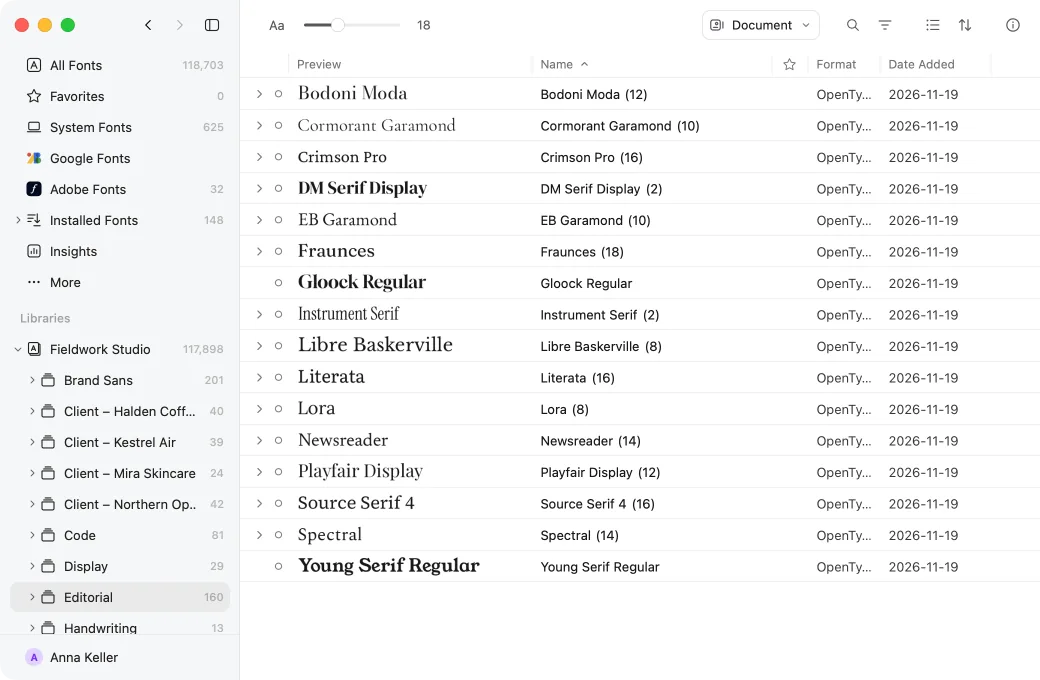
Organize fonts in libraries, sets and tags, find them with search, filters, categories and Smart Sets, and clear out duplicates — fast even with 200,000 fonts.

  • Fast with 200,000 fonts
  • Your folders stay where they are
  • Google Fonts and Adobe Fonts built in
The RightFont window: a design studio’s library of 117,898 fonts

Your folders, sets and tags

Add the folders where your fonts already live — nothing is moved or copied — or keep them in a library you can back up and share. Shortlist fonts in sets, nest sets inside other sets, and tag fonts by client, mood or license.

  • Folders used in place keep their structure
  • A library package backs up and shares as one file
  • A font can be in any number of sets and tags

Find it in a second

Search names, foundries and designers as you type. Combine filters for category, weight, width and language, and save any filter as a Smart Set that keeps itself up to date.

  • Variable serifs that support Polish, in one Smart Set
  • Group the list by category, foundry or date added
  • Search with ⌘F, filters with ⇧⌘F

Duplicates, cleared up

Insights finds every copy of a font and every conflicting version of it, across all your folders and libraries.

  • Each copy with its version and where it lives
  • Select picks the extra copies by rules you set
  • Nothing is removed until you decide

And everything around it.

  • Google Fonts and Adobe Fonts

    The whole Google Fonts catalog, and the fonts Adobe Creative Cloud syncs, next to your own.

  • Categories for every style

    From Oldstyle and Didone to Geometric and Pixel — and fonts that arrive without one are classified for you.

  • Fast with 200,000 fonts

    Very large libraries scroll, search, filter and preview as smoothly as a few hundred fonts.

Questions about organizing

Does RightFont move or copy my fonts?
Only if you ask it to. Add a folder and RightFont uses the fonts where they are, keeping the folder’s structure. Or copy them into a library package, which keeps everything in one file you can back up or share.
Can it handle a very large collection?
Yes. RightFont is built for libraries of 200,000 fonts: they scroll, search, filter and preview as smoothly as a few hundred.
What is the difference between a set and a tag?
Use sets for a project, a publication or a shortlist, and tags for reusable labels such as editorial, geometric or approved. A font can be in any number of sets and tags, and a Smart Set gathers fonts by a filter instead.
Can I keep the libraries from an earlier RightFont?
Yes. Open them and their sets, tags, stars and notes are all there. The old app’s files are read, never changed, so you can switch back at any time.
More answers

Try RightFont free for 15 days.

Every feature, no account needed.