September 29, 2026
Version 10.2.1
More reliable font imports, improved tag management, and fixes for Adobe Illustrator, QuarkXPress, and macOS 27.
✨ Improved
- Clearer import progress, including a finalization stage and a count of unsupported files in the completion notification.
- Subtags can now be dragged back to the main Tags section.
🔧 Fixed
- Font imports now honor the Skip duplicate fonts setting and prioritize OTF and TTF files over web fonts when skipping duplicates.
- Fixed imports targeting the wrong library or set when names match, and font-set membership being lost after reloading a library.
- Fixed saving tag hierarchies, editing newly created tags, and duplicate names when renaming tags.
- Fixed Smart Filters incorrectly interpreting text entered in filter conditions.
- Fixed font selections being lost when changing preview text, font size, or view.
- Fixed Adobe Illustrator repeatedly relaunching after quitting when Auto Activation was enabled.
- Fixed font scanning changing the view in QuarkXPress and duplicate entries in its missing-font list.
- Fixed Inspector toolbar flickering, header spacing, and separator alignment on macOS 27.
- Improved stability when importing fonts, assigning tags, and dragging icon glyphs.
September 14, 2026
Version 10.2
Now with macOS 27 support, faster imports, and smoother font previews.
✨ Improved
- Faster imports and loading for large font libraries and folders, with lower memory usage and smoother progress updates.
- Smoother font previews and rapid scrolling in List view, with less flickering when changing preview text or font size.
- Improved duplicate detection. With Skip duplicate fonts enabled, fonts with the same PostScript name are skipped regardless of version or format.
- More responsive startup and lower memory usage when deleting large numbers of fonts.
🔧 Fixed
- Fixed folder synchronization after deleting files or subfolders in Finder, and unnecessary syncing when reopening RightFont.
- Fixed missing font sets in folders and moving sets between libraries.
- Fixed Type 1 font imports when skipping duplicates or syncing folders, and repeated copying of TTC files during import.
- Fixed missing font detection in QuarkXPress 2025 and 2026 documents, and deactivating fonts in filtered search results.
- Fixed Smart Filters for fonts with an empty license field.
- Fixed drag and drop into empty areas of Grid view.
- Fixed crashes and hangs when loading libraries, moving fonts, resizing list columns, creating libraries, and opening the licensing window.
July 28, 2026
Version 10.1.1
✨ Improved
- Improved font previews for a smoother and more consistent browsing experience.
🔧 Fixed
- Fixed an issue where hovering over the scrollbar area in Grid or List view could unexpectedly open the Inspector and shift interface controls.
- Fixed an issue where activating a folder from its context menu did not correctly activate the fonts it contained.
- Fixed other minor UI and UX issues.
July 8, 2026
Version 10.1
🎉 New
- Added support for importing multiple font files at once by opening multiple files or dragging them onto the RightFont Dock icon.
🔧 Fixed
- Improved synchronization to reduce the chance of conflicts when fonts are being synced.
- Improved the reliability of font activation when multiple apps request fonts at the same time.
- Improved missing font detection for more accurate font activation.
- Fixed a crash that could occur when viewing OpenType features for certain fonts.
- Improved overall performance and responsiveness.
- Fixed other minor UI and UX issues.
June 11, 2026
Version 10.0.1
Some improvements and bug fixes
✨ Improved
- List view now saves the expanded state of font family groups.
- Optimized the process for activating fonts.
- Updated the inspector view to refresh only when visible, reducing unnecessary updates and improving performance.
- Refined font count loading logic for faster and more efficient library loading.
- Improved library status handling for "enabled", "readonly", and "sharedby" states.
- Refined the Style Bar layout to avoid width constraint issues when resizing the window.
- Improved search field behavior: pressing Esc now clears search text first, then closes the filter panel.
- Various code refinements and internal optimizations.
🔧 Fixed
- Fixed an issue where unavailable folders or libraries were not removed correctly after selecting "Remove from Sidebar".
- Fixed excessive toolbar transparency under certain appearance settings.
- Fixed an issue where the sidebar header could overflow upward by 8px on macOS 14.
- Fixed several minor UI issues and improved visual consistency.
June 1, 2026
Version 10.0
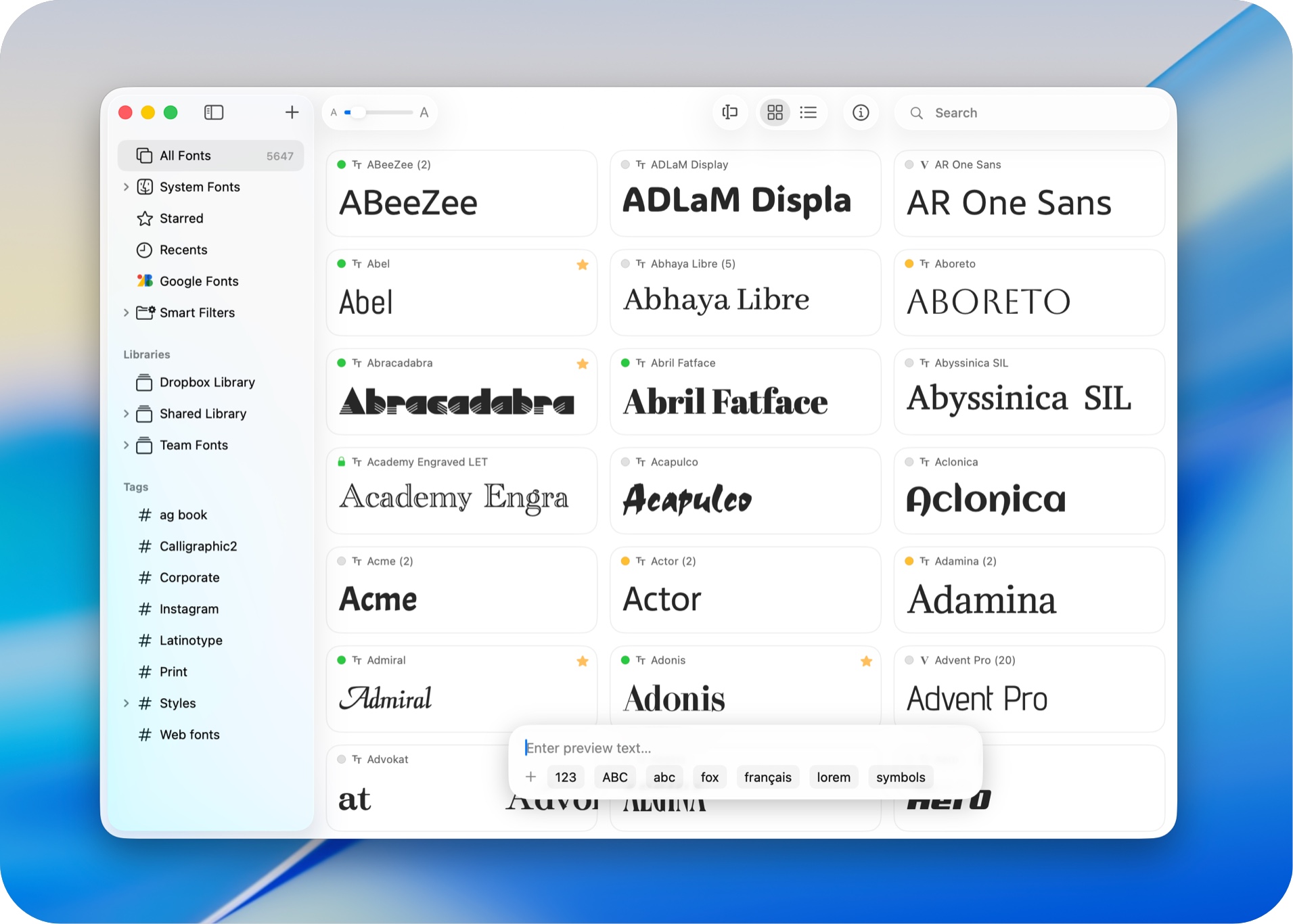
RightFont 10.0 is our biggest release yet — we rebuilt core parts of the app from the ground up to deliver a faster, more flexible, and more refined font management experience.
RightFont 10.0: A Major Upgrade for Font Organization and Preview Workflows
🎉 New
- Add Folders to browse and organize fonts directly from existing folders.
- Completely redesigned Import Fonts workflow with new options, including Create Sets from folders and Create new libraries during import.
- New Preview Text Editor to save, edit, and quickly switch between custom preview presets.
- Fully customizable List View with support for adding/removing columns and reordering columns.
- Font preview in Inspector can now be edited directly.
- Added a new Font Sizes tab for Waterfall preview.
- Added a new OpenType Features tab in Font Inspector.
- Added Nested Tags for better font organization and management.
- Deeply integrated with the new macOS 26 design language for a more modern and native experience.
- Added support for Apple Creator Studio apps.
- Added support for After Effects 2026.
- Added support for Unicode 17.
✨ Improved
- Improved performance when loading large font libraries.
- Significantly faster Google Fonts importing and synchronization.
- Google Fonts now syncs variable fonts by default, significantly reducing storage usage.
- Enhanced font activation reliability across Adobe Creative Cloud apps.
- Improved preview rendering performance and scrolling smoothness.
- Improved search responsiveness and filtering accuracy.
- Enhanced duplicate font detection during import.
- Improved metadata parsing for OpenType and variable fonts.
- Updated multiple interface components for a cleaner and more consistent experience.
- Improved synchronization stability and background processing performance.
- Enhanced compatibility with the latest macOS releases.
- Added right-click menu options to switch between Color and Monochrome icon styles for Google Fonts and Adobe Fonts libraries.
🔧 Fixed
- Fixed an issue where some fonts failed to activate correctly.
- Fixed preview rendering issues with certain variable fonts.
- Fixed occasional crashes during large batch imports.
- Fixed incorrect sorting behavior in List View.
- Fixed Waterfall preview update issues.
- Fixed several Inspector layout and display glitches.
- Fixed duplicate font detection issues in specific edge cases.
- Fixed minor UI bugs and improved overall stability.